> ## Documentation Index
> Fetch the complete documentation index at: https://docs.anyx.app/llms.txt
> Use this file to discover all available pages before exploring further.
# The Anyx WorkOS
> Stop clicking, start delegating. Transform WhatsApp into your operating system.
 ## What is Anyx?
Anyx is not a dashboard, a no-code builder, or another app you have to check. Anyx is the **first WorkOS native to WhatsApp**.
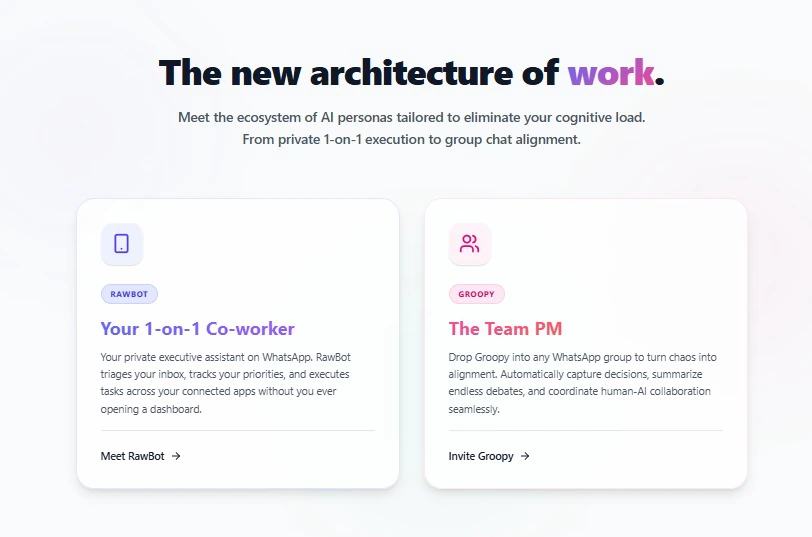
Instead of managing tasks across 10 different platforms, you **delegate** them to autonomous AI agents—**RawBot** (your personal executive assistant) and **Groopy** (your team's operational manager)—using plain English voice notes or text messages.
No dashboards to refresh. No integrations to configure manually. Just chat and operate.
Send voice notes or text exactly as you would to a human employee.
Agents execute across your calendar, CRM, and email without you ever opening a browser.
Set and forget workflows: "Nudge me if XYZ doesn't reply by Thursday."
***
## The Death of Dashboards
Modern work is broken. We spend more time *managing* work in dashboards (Jira, Monday, Salesforce) than actually *doing* work.
Anyx solves this through **Zero-Knowledge Delegation**:
1. You connect your apps via our secure Integration Hub.
2. You open WhatsApp.
3. You tell your agent what to do.
**"Read the noise so I don't have to."**
RawBot flags urgent emails, summarizes long threads, and drafts your replies—directly from WhatsApp.
**"Find 15 minutes with Sarah tomorrow."**
RawBot checks your calendar, handles the email back-and-forth invite, and sets the brief.
**"Don't set timers, set conditions."**
"If a Monday ticket is moved to Done, email the client and update me." RawBot watches and alerts you only when necessary.
## Choose Your Co-Worker
Your private 1-on-1 executive assistant. Perfect for founders testing ideas, triaging emails, and managing daily logistics.
Your team's operational lead. Add Groopy to WhatsApp groups to orchestrate team tasks, align contexts, and automate shared workflows.
***
## Get Started
**Free to try** • Start your 7-day Zero-UI workflow today
1. Sign in to Anyx.app
2. Connect your WhatsApp
3. Send your first task
3-step guide to hiring your first AI co-worker.
Learn how companies deploy Anyx WorkOS for their entire workforce.
## What is Anyx?
Anyx is not a dashboard, a no-code builder, or another app you have to check. Anyx is the **first WorkOS native to WhatsApp**.
Instead of managing tasks across 10 different platforms, you **delegate** them to autonomous AI agents—**RawBot** (your personal executive assistant) and **Groopy** (your team's operational manager)—using plain English voice notes or text messages.
No dashboards to refresh. No integrations to configure manually. Just chat and operate.
Send voice notes or text exactly as you would to a human employee.
Agents execute across your calendar, CRM, and email without you ever opening a browser.
Set and forget workflows: "Nudge me if XYZ doesn't reply by Thursday."
***
## The Death of Dashboards
Modern work is broken. We spend more time *managing* work in dashboards (Jira, Monday, Salesforce) than actually *doing* work.
Anyx solves this through **Zero-Knowledge Delegation**:
1. You connect your apps via our secure Integration Hub.
2. You open WhatsApp.
3. You tell your agent what to do.
**"Read the noise so I don't have to."**
RawBot flags urgent emails, summarizes long threads, and drafts your replies—directly from WhatsApp.
**"Find 15 minutes with Sarah tomorrow."**
RawBot checks your calendar, handles the email back-and-forth invite, and sets the brief.
**"Don't set timers, set conditions."**
"If a Monday ticket is moved to Done, email the client and update me." RawBot watches and alerts you only when necessary.
## Choose Your Co-Worker
Your private 1-on-1 executive assistant. Perfect for founders testing ideas, triaging emails, and managing daily logistics.
Your team's operational lead. Add Groopy to WhatsApp groups to orchestrate team tasks, align contexts, and automate shared workflows.
***
## Get Started
**Free to try** • Start your 7-day Zero-UI workflow today
1. Sign in to Anyx.app
2. Connect your WhatsApp
3. Send your first task
3-step guide to hiring your first AI co-worker.
Learn how companies deploy Anyx WorkOS for their entire workforce.